Telegram and AI bots for business

We automate one specific process — from lead capture and booking to document handling, AI consultations and passing data to a CRM.

See cases
01What we solve
01Lead capture
02Client booking
03Lead qualification
04Forms and questionnaires
05FAQ and consultations
06AI assistants
07Photo handling
08PDF and documents
09OCR
10Handoff to a manager
11CRM
12API
13Excel / Google Sheets
14Payments
15Notifications
02What tasks bots solve

Each bot closes one specific task — without unnecessary features.

01

Lead capture

Collecting requests from Telegram without losing contacts.

02

Client booking

Choosing a service, a time slot and confirming the booking.

03

Consultation

Answering common questions without a manager.

04

Document handling

Accepting and processing files, photos and PDFs.

05

OCR

Recognizing text and data from documents.

06

Photos

Accepting and processing photos from the client.

07

AI

An AI assistant for dialogue and request handling.

08

CRM

Passing leads and data into a CRM.

09

Manager notifications

An instant alert on every new request.

10

API / databases

Connecting the bot to external systems.

11

Excel / Google Sheets

Exporting requests into spreadsheets.

12

Payments / Mini App

Accepting payments and an extended interface.

03Real cases

Bots and Mini Apps we show clients — with real scenarios and interfaces.

Telegram bot · photo-based estimate

KuzovBaza

Clients wanted to quickly learn the approximate cost of body repair without visiting the shop.

The client starts the bot, taps "Estimate repair from a photo" and, following the bot's instructions, sends 2–4 photos of the damage.

Accepting and pre-processing damage photos for a further repair cost estimate.
ClientBotDamage photoProcessing
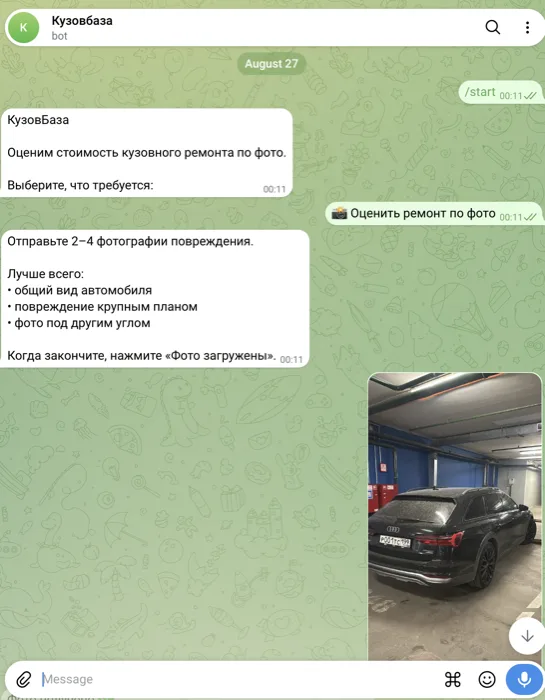
KuzovBaza — a photo-based repair estimate bot

Telegram Mini App · repair status

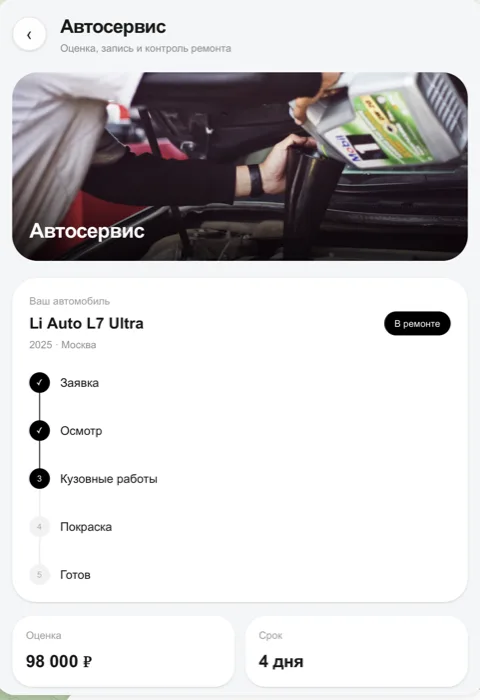
Auto service

Auto service clients called in just to ask about repair status, cost and timing.

The client opens the Mini App and sees the repair status by stage — from request to ready — along with the cost estimate and timeline.

Keeping the client informed on repair status, cost and timing without phone calls to a manager.
ClientMini AppRepair statusEstimate and timeline
Auto service — a repair status tracking Mini App

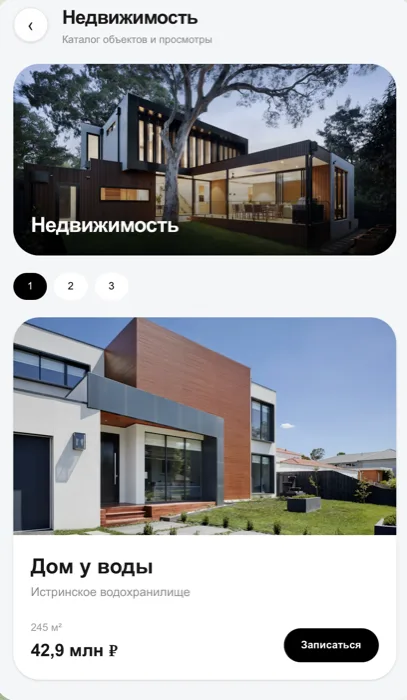
Telegram Mini App · property catalog

Real estate

Needed a convenient way to show a property catalog and collect viewing requests directly in Telegram.

The client browses property cards with photos, area and price, and taps "Book a viewing" on the one they like.

Showing the property catalog and booking a viewing without a call to a manager.
ClientMini AppProperty catalogViewing request
Real estate — a property catalog Mini App

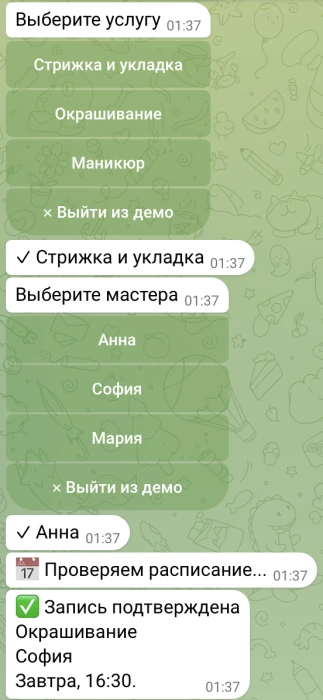
Telegram bot · booking

Beauty salon

The salon administrator spent time answering calls and booking clients by hand.

The client picks a service and a specialist in the chat, the bot checks the schedule and confirms the booking with a date and time.

Choosing a service, choosing a specialist and confirming the booking without an administrator.
ClientBotService and specialistBooking confirmed
Beauty salon — a booking bot
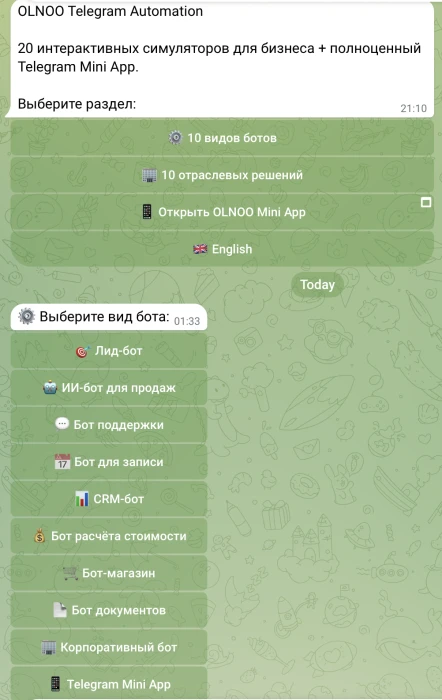
04Interface gallery

All scenarios are collected in one OLNOO demo bot — available to explore in Telegram.

OLNOO Telegram Automation — a catalog of 10 bot types, 10 industry solutions and a Mini App
05How the automation is built

Every bot follows the same base flow — from the client's message to a ready request in the manager's hands.

  1. 01

    Client

  2. 02

    Telegram

  3. 03

    Scenario

  4. 04

    AI / processing

  5. 05

    CRM / database / Excel

  6. 06

    Manager

01Client. Reaches out via Telegram, no app install needed.
02Telegram. A single entry point for chat and Mini App.
03Scenario. A pre-designed dialogue logic and set of steps.
04AI / processing. Understanding the request, recognizing photos and documents.
05CRM / database / Excel. Saving the client's request and data.
06Manager. Receives a ready request with no manual entry.
06How we work
01

Understand the process

We look at how the process works today and what can genuinely be simplified.

02

Cut unnecessary steps

We keep only what's actually needed to reach the outcome.

03

Design the scenario

We map the dialogue logic and transitions between steps.

04

Build an MVP

We build a working version of the bot for the core scenario.

05

Test

We check the scenario and integrations against real data.

06

Connect integrations

We connect the bot to a CRM, spreadsheets, API or payments.

07

Launch

We publish the bot and hand it over for use.

07Integrations
  • OpenAI and other AI models
  • CRM
  • REST API
  • Databases
  • Google Sheets / Excel
  • Email
  • Telegram
  • Payment systems
  • Mini App
08Timeline and pricing
Simple MVP

from 3 business days

Price

from ₽20,000

Complex AI / API / CRM projects are scoped separately after we review the scenario.

09Bot variants

These directions will later become dedicated pages.

  • Booking bot
  • Lead capture bot
  • AI consultant
  • Document bot
  • Real estate bot
  • Auto service bot
  • Beauty bot
  • Internal bot for staff
10FAQ
Can you connect GPT?

Yes, we connect OpenAI and other AI models wherever the scenario needs it.

Can you integrate a CRM?

Yes, we pass leads and data to a CRM via API or ready-made integrations.

Can the bot accept documents and photos?

Yes, the bot can accept photos, PDFs and documents, including OCR recognition.

Can you handle payments inside the bot?

Yes, we can connect payment systems directly into the scenario where needed.

Can you build a Telegram Mini App?

Yes, for more complex interfaces we can build a Mini App on top of the bot.

Who pays for the API and server?

Third-party API costs (for example, AI models) and hosting are paid by the client separately from the development fee.

11Related services
Next step

Have a process your team still does by hand?

Describe it in a few sentences. We'll suggest what's worth automating and which MVP to launch first.

Message us on Telegram